Support Center
PC Client
Support Center
Solution to Windows unable to install HZVPN
Due to Windows security policy updates, some users may be blocked by the system security function when installing HZVPN, resulting in the inability to install the application normally.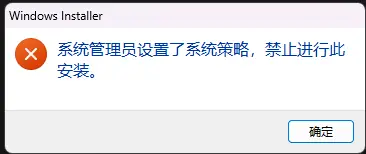
If the installation is blocked or the installer cannot be run during the installation process, you can follow the steps below to close Smart App Control and then reinstall.
Solution steps:
If the installation is blocked or the installer cannot be run during the installation process, you can follow the steps below to close Smart App Control and then reinstall.
Solution steps:
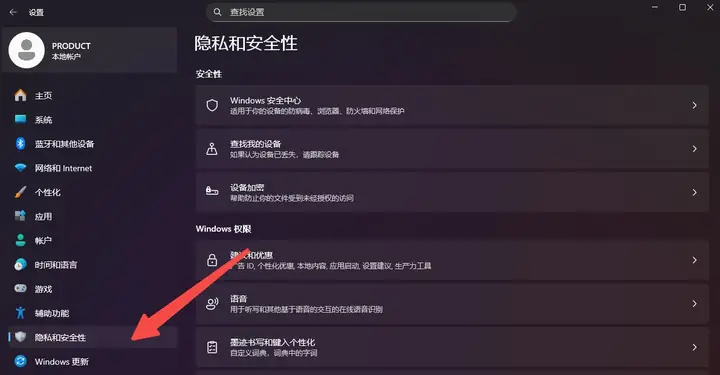
- Open system Settings, click Privacy & security in the left navigation bar.
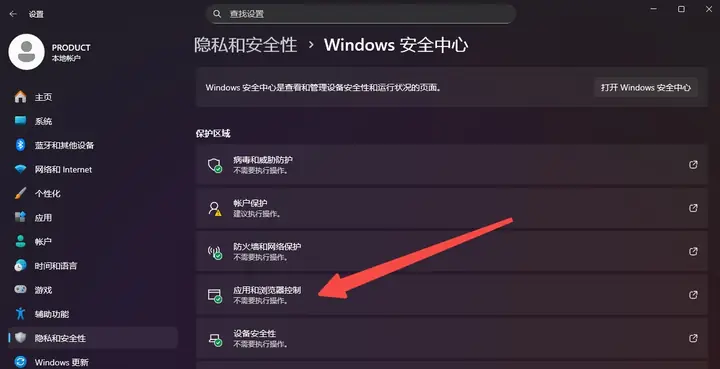
- Open Windows Security, then click App & browser control。
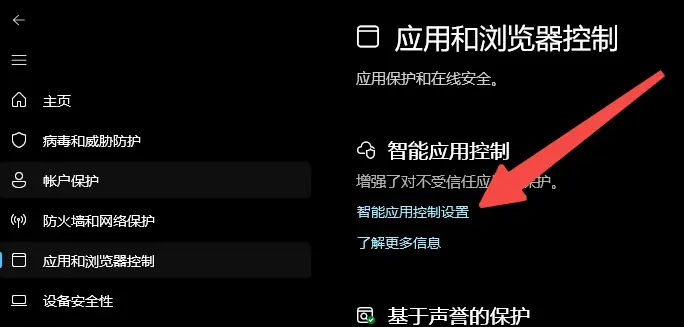
- On the App & browser control page, click Smart App Control settings。
- On the Smart App Control page, set the option to Off to prevent HZVPN from being misjudged by the system and preventing installation.
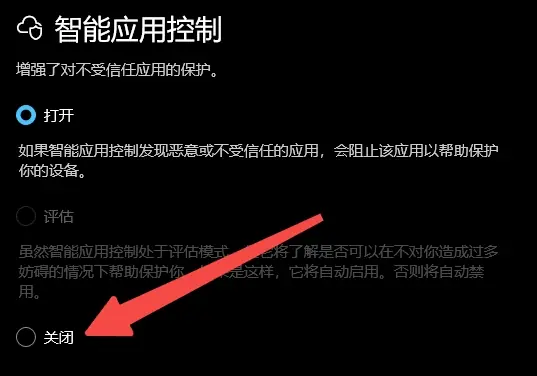
- Reinstall HZVPN
After completing the above settings, please re-run the HZVPN installer.
If you still can't install, pleaseRestart the device and try the installation again。