Support Center
FAQ
Support Center
VIP to SVIP upgrade: steps and price difference
VIP users can upgrade to SVIP at any time and enjoy the "upgrade difference" discount. The system will convert the remaining days of your VIP into a discount amount, which will be directly deducted from the price of SVIP.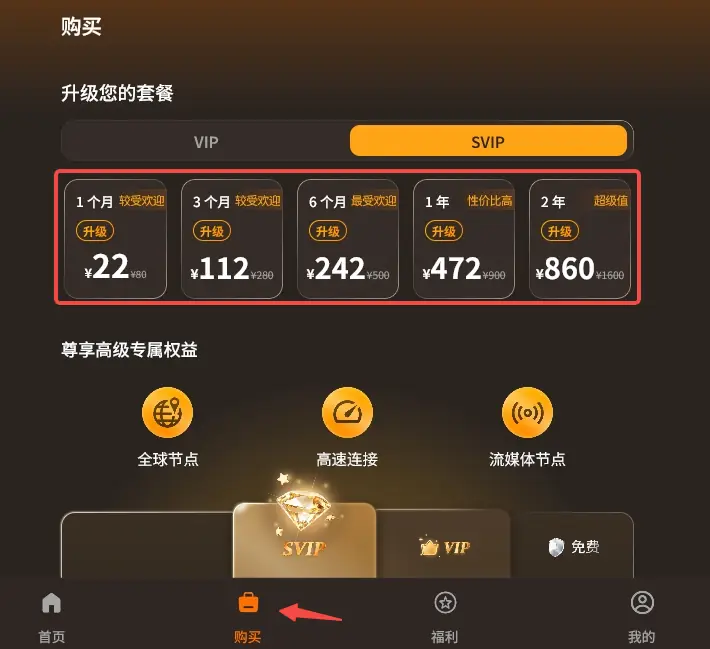
Upgrade method
- Open the app and click "Purchase" at the bottom
- Switch to the "SVIP" tab. The packages marked with "Upgrade" are the packages that can be purchased with the price difference.
- Select the SVIP package you want. The price is the upgrade price after deducting discounts.
- Confirm purchase, select payment method and complete payment
How to calculate the upgrade price difference?
Upgrade offer = VIP remaining days × rate- The daily discount amount is determined according to the interval of the remaining days. The fewer the remaining days, the more discounts will be made each day.
- If the remaining days are less than one day, it will be calculated as one day. If the discount amount has decimals, it will be rounded up.
- Actual amount paid = SVIP package price − upgrade discount
- For example: There are 20 days left for VIP, and the daily discount is 1 yuan, and the upgrade discount is 20 × 1 = 20 yuan. When purchasing an SVIP package, 20 yuan is deducted from the package price to get the actual payment.
What happens after upgrading
- Remaining VIP days: have been converted into discounts and will no longer be retained.
- Account benefits: Use SVIP benefits immediately after successful upgrade.
- Validity period: subject to the length of the SVIP package you purchased.
- After SVIP expires: the account becomes a free user and will not return to VIP.
Under what circumstances can’t you see the upgrade package?
- Upgrade discount is higher than SVIP package price
Things to note
- Please confirm the SVIP package duration before purchasing. If the VIP has a long remaining time but chooses a shorter SVIP package, after the SVIP expires, the overall usage time may end earlier than the original VIP.
- If you just want to extend the usage time, please select "Renew" under the VIP tab. No upgrade is required.
- The actual discount amount is subject to the display on the purchase page.
- If you have any questions, please submit a work order in "My" → "Service Center" and attach a payment screenshot.