Support Center
FAQ
Support Center
The difference between global mode and smart mode
In the upper right corner of the server area on the homepage, there are two modes to switch between: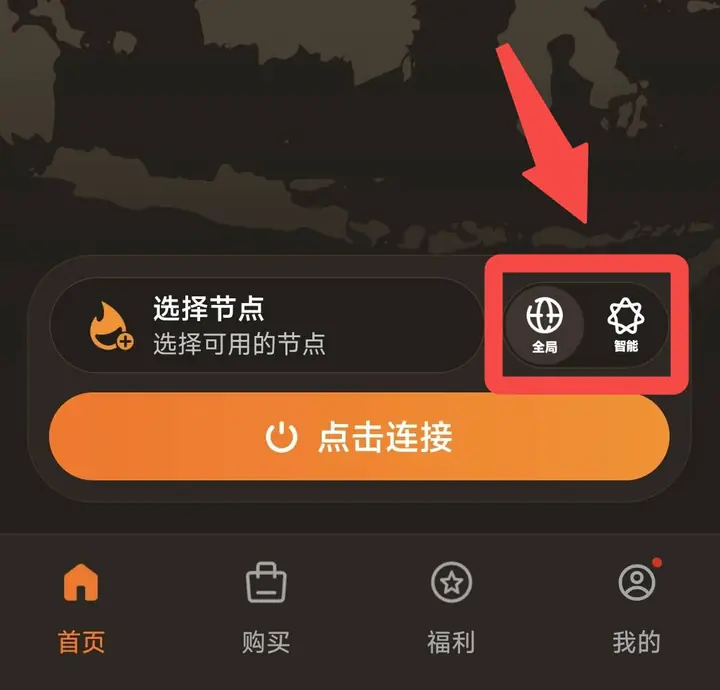
Application mode entry: Click "My" on the bottom navigation bar → click "Application Mode" to enter settings.
For detailed setting steps of application mode, please refer to the FAQ related to "Application Mode".
global mode
After turning on, the deviceAll network traffic(Including access to websites/Apps in mainland China and overseas) will be forwarded through VPN servers.- advantage: The best compatibility, suitable for some websites or apps that can never be opened in "smart mode".
- shortcoming: Since the traffic accessing mainland websites/Apps will also bypass the VPN, the speed will be relatively high.stuck, slow。
Smart mode
After turning it on, the system willAutomatic judgmentTraffic type:- accessChinese mainlandWebsites and Apps → Take yourlocal network(Not going through VPN, faster)
- accessBlocked overseasWebsite and App → GoVPNserver
Which one to choose?
- Recommendations for daily useSmart mode, faster and smoother access to mainland content.
- If you find that a website or app is in smart modeCan't open, you can try switching toglobal mode, see if it can be accessed normally.
⚠️ If a certain website/App is always inaccessible, there is a more accurate method
if onlyIndividual specific apps or websitesInaccessible. In addition to switching global mode, you can also use "application mode” function, you can directly set the app or website to bypass the VPN and use the local network without switching the overall mode. The access speed is faster and more accurate.Application mode entry: Click "My" on the bottom navigation bar → click "Application Mode" to enter settings.
For detailed setting steps of application mode, please refer to the FAQ related to "Application Mode".
For detailed setting steps of application mode, please refer to the FAQ related to "Application Mode".