3. PCクライアント

サポートセンター

PCクライアント

サポートセンター

Tun2Proxy切断後にネットワークが使えなくなる

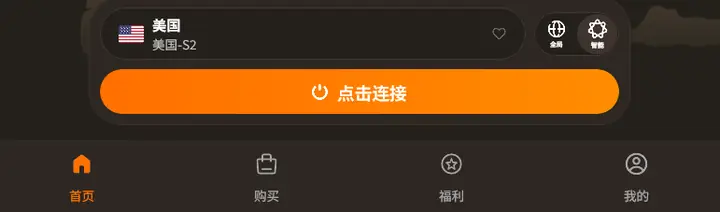
  1. この状況に遭遇した場合、まず切断されていることを確認してください。アプリ下部の「マイページ」の列を選択しますScreenshot 1 for “After using tun2proxy to disconnect, the original network was abnormal (unable to connect to the Internet normally).”
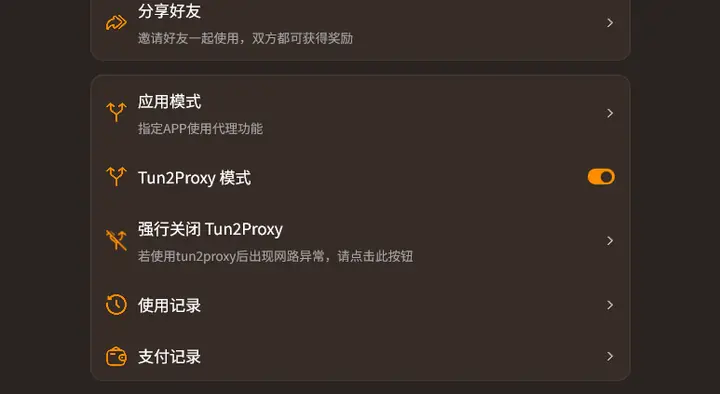
  2. 「マイページ」の画面で、「Tun2Proxyを強制終了」の項目を見つけてタップします。Screenshot 2 for “After using tun2proxy to disconnect, the original network was abnormal (unable to connect to the Internet normally).”
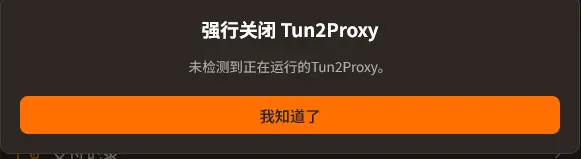
  3. 正常に検出・終了できた場合、以下のポップアップが表示され、tun2proxyが正常に終了したことが通知されます。Screenshot 3 for “After using tun2proxy to disconnect, the original network was abnormal (unable to connect to the Internet normally).”
  4. 以下のポップアップが表示された場合は、tun2proxyの実行が検出されなかったことを意味し、ネットワークは正常に動作しているはずです。Screenshot 4 for “After using tun2proxy to disconnect, the original network was abnormal (unable to connect to the Internet normally).”
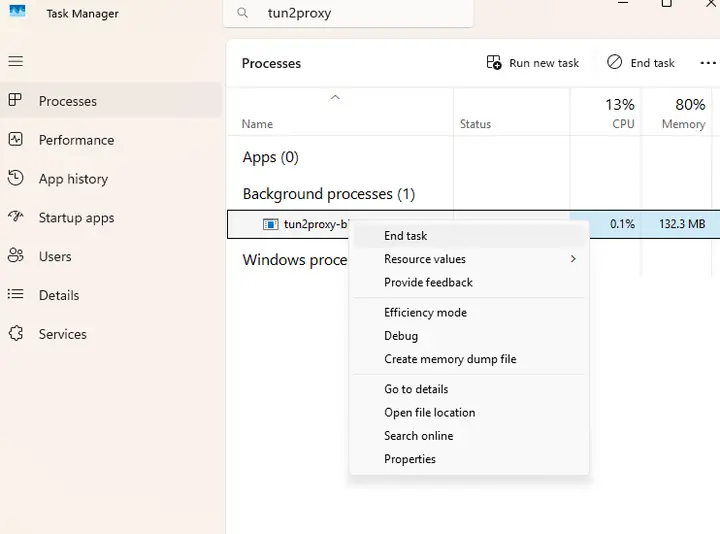
  5. 上記の方法でも解決しない場合は、「タスクマネージャー」を開き、検索バーでtun2proxyを検索し、該当のプログラムを右クリックして「タスクの終了」を選択してみてくださいScreenshot 5 for “After using tun2proxy to disconnect, the original network was abnormal (unable to connect to the Internet normally).”